
WOOCOMMERCE BACKEND. CUSTOM FRONTEND.
Headless WooCommercedevelopment with Next.js.
Headless WooCommerce separates the storefront from the commerce backend. WooCommerce continues to manage products, inventory, and orders, while Next.js handles the website your customers use.
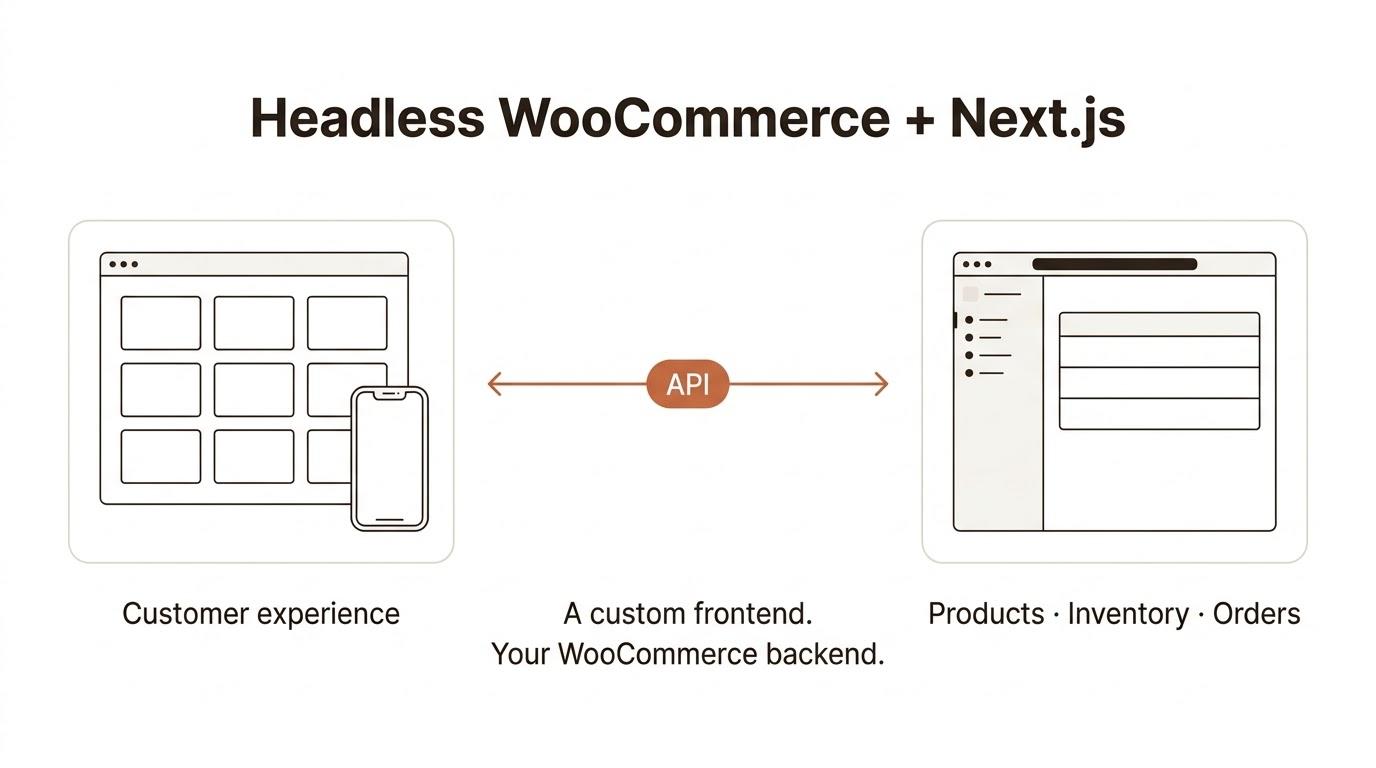
We build custom storefronts for businesses that want to keep WooCommerce and need more control over the shopping experience. That includes the product pages and cart, but also the work behind them: connecting APIs, checking plugin compatibility, planning checkout, and preparing the site for launch.
You can continue managing your catalogue in WooCommerce. We scope what needs to change on the frontend before development starts.
RELATED WORK
Relevant ecommerce work
A custom storefront needs to connect product information, browsing, cart interactions, and checkout. These Shopify projects show related ecommerce development work. They are not headless WooCommerce case studies.
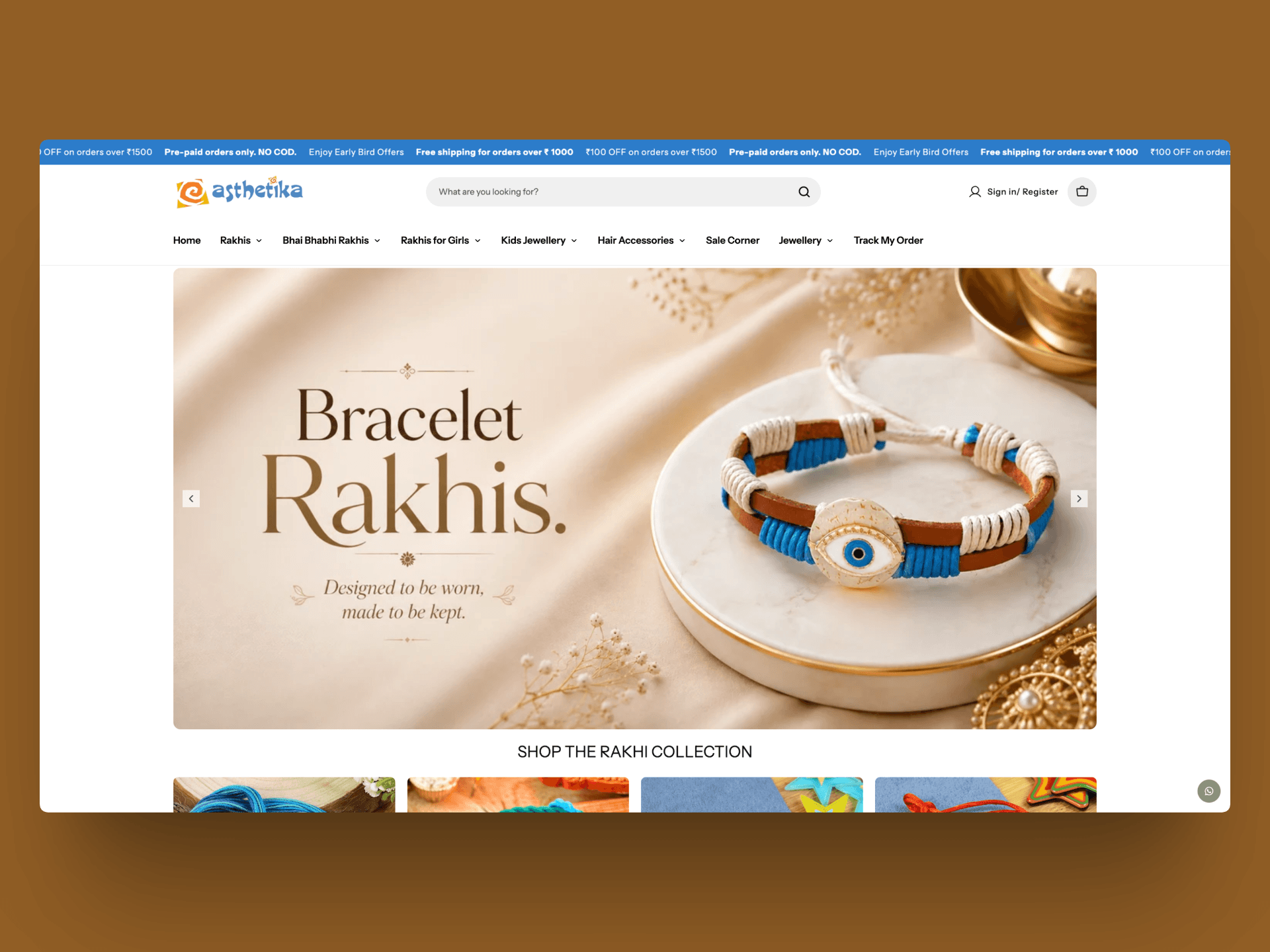
Aesthetika: product browsing and a custom cart drawer
Aesthetika sells rakhis, jewellery, and accessories. Our frontend scope included dynamic product pages, custom metafields, collection filtering, infinite scroll, and a cart drawer with related products and add-ons. The work also included a one-click checkout integration and product-page SEO.
The relevant part is how the interface connects to product data. Customers need to find an item, choose it, and carry that selection through to checkout.

360 Alpha: Figma to Shopify development
For 360 Alpha, the scope included translating the supplied Figma design into Shopify Liquid, CSS, and JavaScript. Product content used custom metafields, alongside collection filters, cart interactions, and integrations with Klaviyo, a bundle builder, and Judge.me.
This project demonstrates implementing a defined design while making room for product information and third-party tools.
IS IT A FIT?
When does headless WooCommerce make sense?
A slow store needs diagnosis before it needs a new framework. Large images, expensive database queries, heavy scripts, or poor hosting can affect a traditional store. Moving the interface to Next.js does not automatically fix all of those problems.
Headless becomes worth considering when there is a specific requirement for a separate frontend.
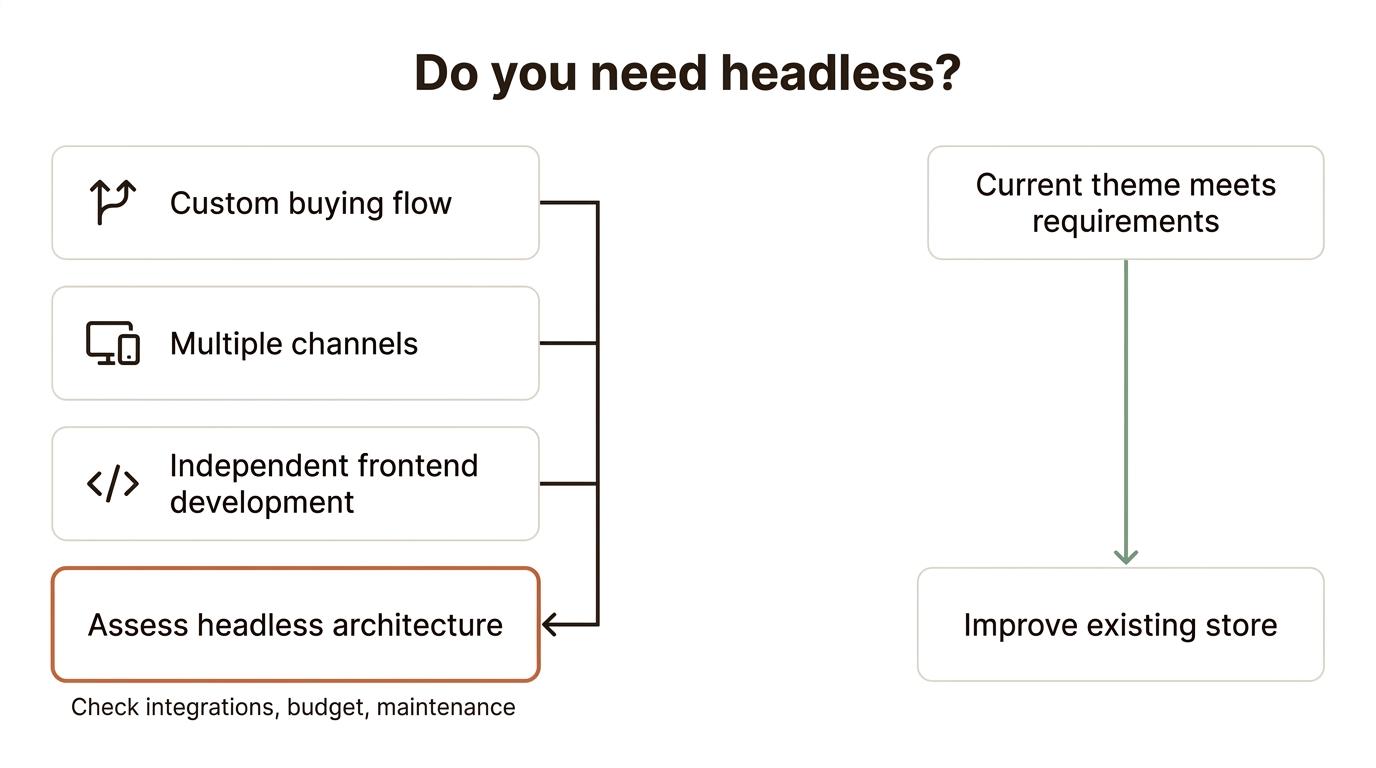
Your buying flow needs custom development
For example, a furniture store might need customers to configure dimensions, finishes, and accessories before requesting a quote. A separate frontend can give us a useful structure for that interaction, while WooCommerce remains responsible for the underlying products and orders.
A custom WooCommerce theme can also support complex features. We would compare both approaches against the actual requirements before recommending a rebuild.
You have more than one storefront or channel
A website, mobile application, or another sales interface can use the same commerce backend. Each interface still needs its own development, authentication, and integration work, but your team can keep managing the catalogue in one place.
Your team needs a separately maintained frontend
Headless can suit a business that wants to develop its storefront independently of the WordPress theme. That separation also creates another application to host, monitor, and update.
If your existing theme can support the required design and buying flow, improving it may be the more practical investment. We would establish that during scoping.
THE ARCHITECTURE
How it works: what stays and what changes
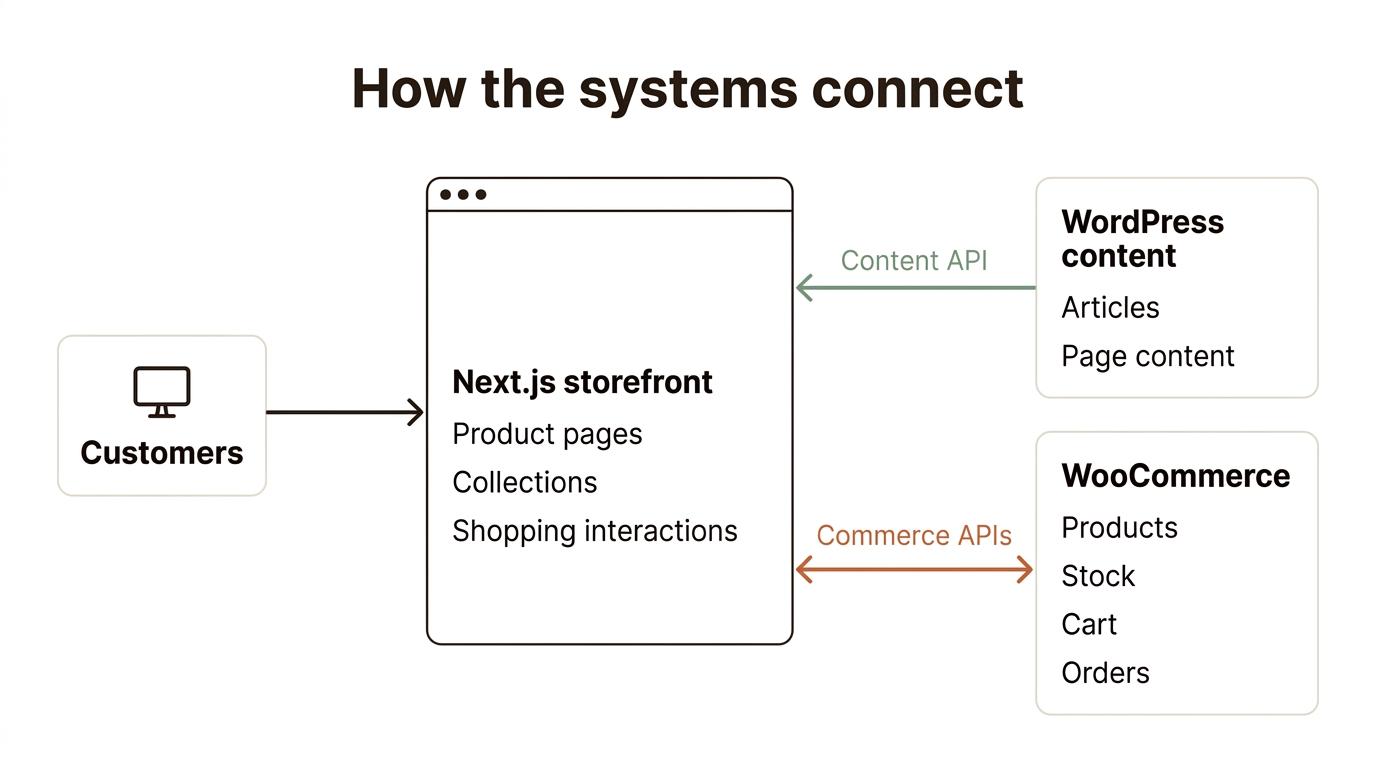
The main change is where the customer-facing website runs. Instead of WordPress rendering the storefront through a PHP theme, a separate frontend requests the data it needs through APIs.
Customer → Next.js storefront → WooCommerce APIs → products, cart, and orders
WordPress can also supply articles and page content to the storefront.
| Part of your store | What happens in a headless build |
|---|---|
| Products, variations, prices, and inventory | Remain in WooCommerce; the storefront retrieves and displays the required data. |
| Existing customers and order history | Remain in the existing backend; access from the new interface needs an agreed account and authentication setup. |
| Product and category layouts | Built in the new frontend. |
| Cart and customer interactions | Connected to commerce APIs, with session handling planned explicitly. |
| Checkout | Kept in WooCommerce or implemented in the new frontend, depending on compatibility and scope. |
| WordPress articles and pages | Can remain in WordPress, with their content rendered through new frontend templates. |
| Plugins | Assessed individually; backend operation and storefront display are separate questions. |
Where APIs fit
WooCommerce's Store API provides endpoints for customer-facing product, cart, and checkout functionality. For example, this request retrieves public product data:
curl "https://your-store.example/wp-json/wc/store/v1/products?per_page=3"
The storefront turns the returned data into product cards and pages. Retrieving products is only one part of the build; cart sessions, customer accounts, payment flows, and error handling need their own implementation.
Authenticated administrative API credentials belong on the server. They should not be included in frontend JavaScript sent to customers.
WooCommerce documents these Store API capabilities here. For a longer explanation, read our headless WooCommerce with Next.js architecture guide.
Why Next.js?
Next.js is the main frontend framework for this service. We use the architecture phase to decide how pages should render, which data can be cached, and how updates reach the storefront.
Another modern framework can be considered where it fits your requirements and maintenance team. The choice should follow the store's needs and the agreed support scope.
DEVELOPMENT SCOPE
What we build for your store
Product pages that match the information customers need
We can build product layouts around variations, specifications, sizing information, availability, and purchase options. The content model matters here: a shared template needs reliable product data behind it.
Collection browsing, search, and filters
We scope filters around how customers choose products, such as size, material, compatibility, or price. Search and filtering also need a plan for query performance, pagination, and empty results.
Cart and custom buying flows
The scope can include quantity changes, coupons, bundles, quote requests, or product configuration. For a custom bundle, for example, the selected products, prices, and stock rules need to remain consistent between the interface and WooCommerce.
Customer accounts
Where included, we build the agreed account experience, such as sign-in, address management, and access to order history. The authentication method is part of the architecture, rather than something added after the pages are finished.
WordPress content and integrations
We can connect WordPress content to frontend templates and build the editing and preview workflow your team needs. Reviews, email signup, search services, and operational integrations can also be included after checking the available APIs and vendor requirements.
The proposal identifies which of these features are included and which require additional development.
COMPATIBILITY
Checkout, payments, and plugin compatibility
The product page may be the most visible part of the rebuild. Checkout and plugin behaviour usually need the more careful decisions.
Keeping WooCommerce checkout
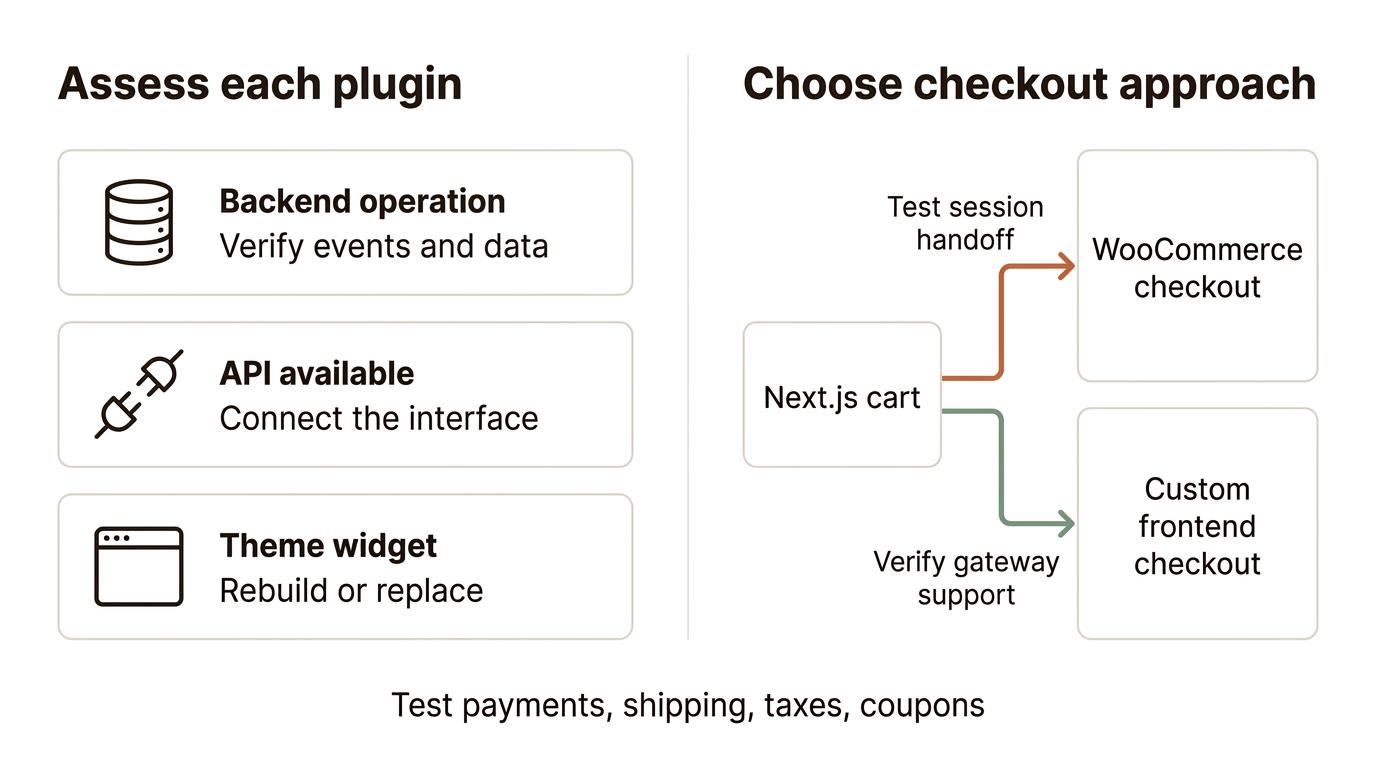
One option is to build browsing and cart interactions in Next.js, then send customers to WooCommerce checkout. This can help retain an existing checkout setup, but the cart and customer session must transfer correctly.
A cart created through an API does not automatically appear in a separate browser checkout session. We need to implement and test that handoff, including coupons, variations, shipping, and guest or signed-in customers.
Building checkout in the new frontend
A custom checkout requires checking the selected gateway, payment authentication steps, shipping and tax rules, and any checkout extensions. The WooCommerce Checkout API supports order creation from the current cart and payment handling, but that does not mean every gateway or checkout plugin will work without extra development. WooCommerce Checkout API documentation.
Cart identity also needs deliberate handling. WooCommerce provides cart tokens for headless cart interaction; token-based API access and a browser checkout handoff are different implementation concerns. WooCommerce cart-token documentation.
What happens to existing plugins?
| Plugin behaviour | What we assess |
|---|---|
| Runs in the backend, such as an order export | Whether it still receives the events and data it expects. |
| Provides data through an API | Whether its API supports the required frontend behaviour. |
| Adds a widget or layout to the WordPress theme | Whether that interface needs rebuilding or replacing. |
| Changes checkout, pricing, or subscriptions | Whether those rules work with the chosen cart and checkout approach. |
For example, a review plugin may continue storing reviews in WordPress while its theme widget no longer appears. The new storefront needs a supported way to retrieve and display those reviews.
Before development, the scope should identify what stays, what needs connecting, and what needs rebuilding. Prices and availability also need appropriate cache rules so customers do not rely on stale information.
FROM AUDIT TO LAUNCH
Our development and migration process
We start by checking the store and agreeing the architecture, then build and test the storefront on staging before launch.
Each stage has a defined deliverable. The plan covers plugin compatibility, checkout, SEO, cutover, and who takes responsibility after handover.
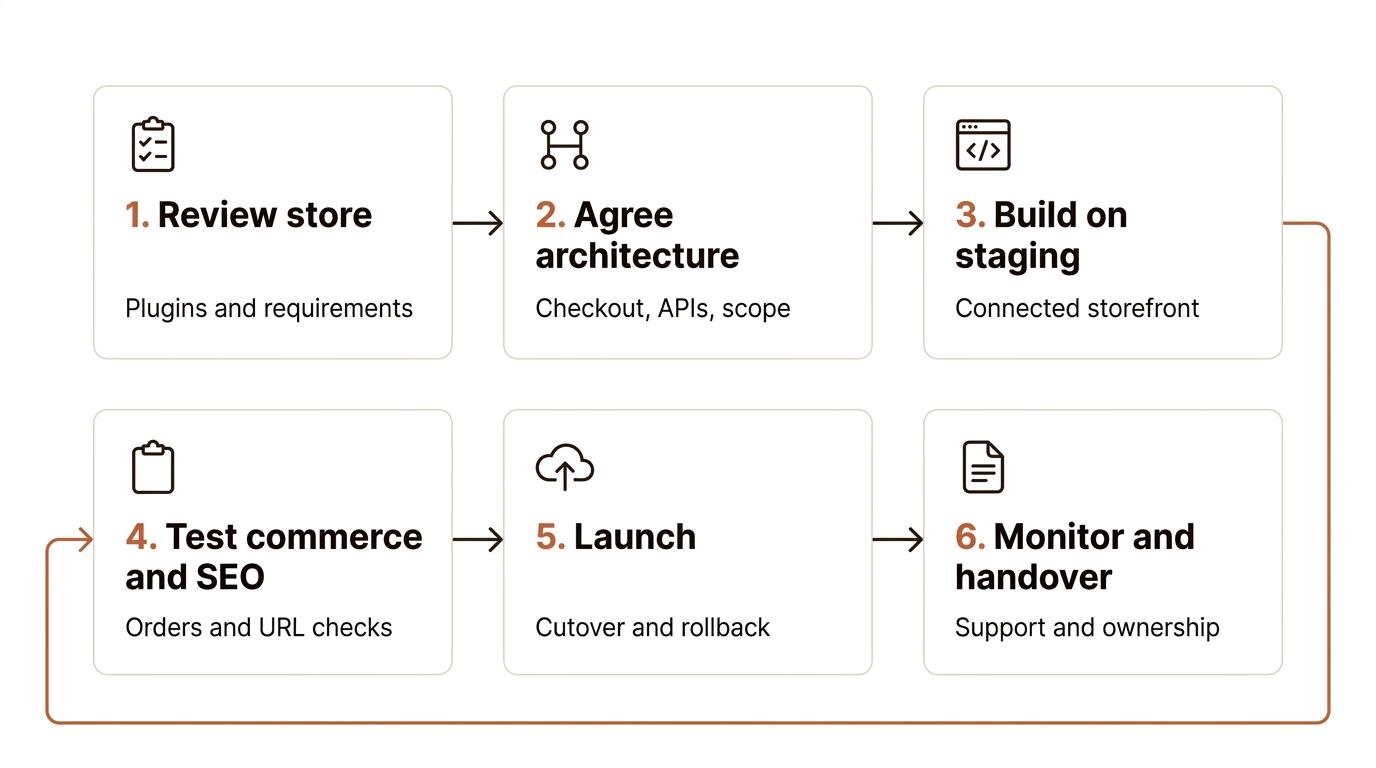
1. Review the existing store
We start with the required buying flow, catalogue, important plugins, payment methods, integrations, and current URLs. The aim is to decide whether headless fits and identify the dependencies that affect the estimate.
Deliverable: a suitability recommendation and an initial compatibility assessment.
2. Agree the architecture and scope
We define the frontend templates, API approach, cart sessions, checkout, accounts, content editing, and hosting responsibilities. We also agree how changes to products, prices, and inventory reach the storefront.
Deliverable: a written scope, architecture plan, and project estimate.
3. Build the storefront on staging
We implement the agreed design and connect it to a suitable staging setup. You review the buying flow as it develops, including loading states, unavailable products, and failed requests.
Deliverable: a staging storefront for review against the agreed scope.
4. Validate commerce and SEO
We test product selections, cart changes, coupons, shipping, taxes, accounts, and the agreed payment methods. For SEO, we compare important URLs, titles, descriptions, canonicals, internal links, structured data, and sitemaps.
Where URLs need to change, we prepare a redirect map. Existing URLs should remain where practical. Search visibility can fluctuate during a migration, so launch planning includes monitoring rather than a promise of unchanged rankings. Google's site-move guidance.
Deliverable: completed checks and an agreed list of launch requirements.
5. Launch with a recovery plan
We agree the cutover steps, backups, responsibilities, and rollback conditions. The checks include test orders and verifying that the production storefront reaches the correct backend.
Deliverable: the production storefront and documented launch checks.
6. Check the live site and hand over
During the agreed support window, we review order and payment errors, broken links, and integration behaviour. We hand over the code, access information, and guidance for the agreed editing workflow.
Deliverable: handover documentation and a clear maintenance responsibility list.
SCOPE & INVESTMENT
Cost, scope, and delivery time
The estimate depends on what the storefront needs to do. A build that keeps WooCommerce checkout has a different scope from one with a custom checkout, subscriptions, and wholesale pricing.
Compare the service options below. The written proposal defines the final inclusions, price, and delivery schedule.
| Features | Storefront Launch | Custom Storefront | Advanced Commerce |
|---|---|---|---|
| Service name | Storefront Launch | Custom Storefront | Advanced Commerce |
| Service description | Next.js storefront using your existing design | Custom design and shopping interactions | Complex buying rules and integrations |
| Delivery time | 7–10 days | 14–21 days | Agreed after scoping |
| Number of page templates | 5 core templates: home, product, category, cart, and checkout | 5 core templates plus blog and standard content pages | Everything in Custom Storefront plus custom page templates |
| Revisions | 2 | 4 | 10 |
| E-commerce functionality | Products, variations, and cart | Custom layouts and cart interactions | Custom buying flows and business rules |
| Payment integration | WooCommerce checkout handoff | Checkout selected after gateway review | Custom or hybrid checkout after compatibility review |
| Price | ₹30,000–₹50,000 | ₹50,000–₹80,000 | ₹1,20,000–₹1,50,000 |
A template is a reusable layout. Connecting a product template to an existing catalogue is different from manually uploading or correcting each product. Product-entry allowances should be stated separately from the number of products the store can hold.
The delivery schedule starts from the milestone agreed in the proposal, once the required access, content, and design inputs are available. New features and additional review rounds may change that schedule.
Running costs: Budget separately for WordPress/WooCommerce hosting, frontend hosting, paid plugins or services, and ongoing maintenance unless the proposal includes them. Tax treatment and licence ownership will be stated with the final price.
See detailed pricing and add-ons
Detailed service features
| Features | Storefront Launch | Custom Storefront | Advanced Commerce |
|---|---|---|---|
| Functional website | Connected Next.js and WooCommerce storefront | Connected custom storefront | Connected storefront and scoped integrations |
| Design input | Supplied design or agreed design direction | Custom design requirements | Design and interaction requirements |
| Content upload | Yes | Yes | Yes |
| Plugins/extensions integration | Compatibility review and named integrations | Named frontend/API integrations | Custom middleware and API integrations |
| Number of products to upload | 15 | 20 | 50 |
| Product variations and custom fields | Existing catalogue and variations | Catalogue plus agreed custom fields | Custom catalogue and pricing rules |
| Cart functionality | Quantity updates and agreed coupon flow | Custom cart interactions | Custom cart and business rules |
| Customer accounts | Guest checkout | Guest checkout | Advanced customer account features |
| Opt-in form | No | Yes | Yes |
| Speed optimization | Image, rendering, and cache checks | Baseline plus scoped improvements | Performance plan for catalogue and integrations |
| SEO setup and migration | Metadata, sitemap, and launch URL checks | Baseline plus scoped migration work | SEO requirements defined during discovery |
| Hosting setup | Yes | Yes | Yes |
| Social media icons | Yes | Yes | Yes |
| WordPress editing and preview | No | Yes | Yes |
| Post-launch support | 5 days | 14 days | 30 days |
Add extra services
| Optional work | What needs defining | Extra price | Delivery impact |
|---|---|---|---|
| Additional page or template | Existing layout with new content, or a new layout | ₹12,000–₹18,000 | 3 days |
| Additional revision round | The pages and changes included in the round | ₹5,000–₹8,000 | 2 days |
| Additional product entry | Product count, variations, media, and data cleanup | ₹500–₹1,000/product | 2 days |
| Additional plugin integration | API access, required interface, and business rules | ₹2,000–₹5,000 | 1 day |
| Additional payment method | Gateway support and end-to-end payment flow | ₹5,000–₹10,000 | 1–2 days |
| Email signup and marketing connection | Form, consent, destination platform, and any automation | ₹2,000–₹5,000 | 1 day |
| Additional hosting environment | Account ownership, deployment, and monitoring requirements | ₹2,000–₹5,000 | 1 day |
| Extended performance work | A defined issue and an agreed validation method | ₹5,000–₹10,000 | 3–5 days |
| Expedited delivery | Available capacity and which milestones can be shortened | 10–20% surcharge | Available on request; revised schedule agreed |
Plugin installation and frontend integration are different tasks. An installed plugin may still need custom interface development. Social links can be covered in the agreed footer scope; they do not need a separate integration tier.
AFTER LAUNCH
Editing, handover, and ongoing maintenance
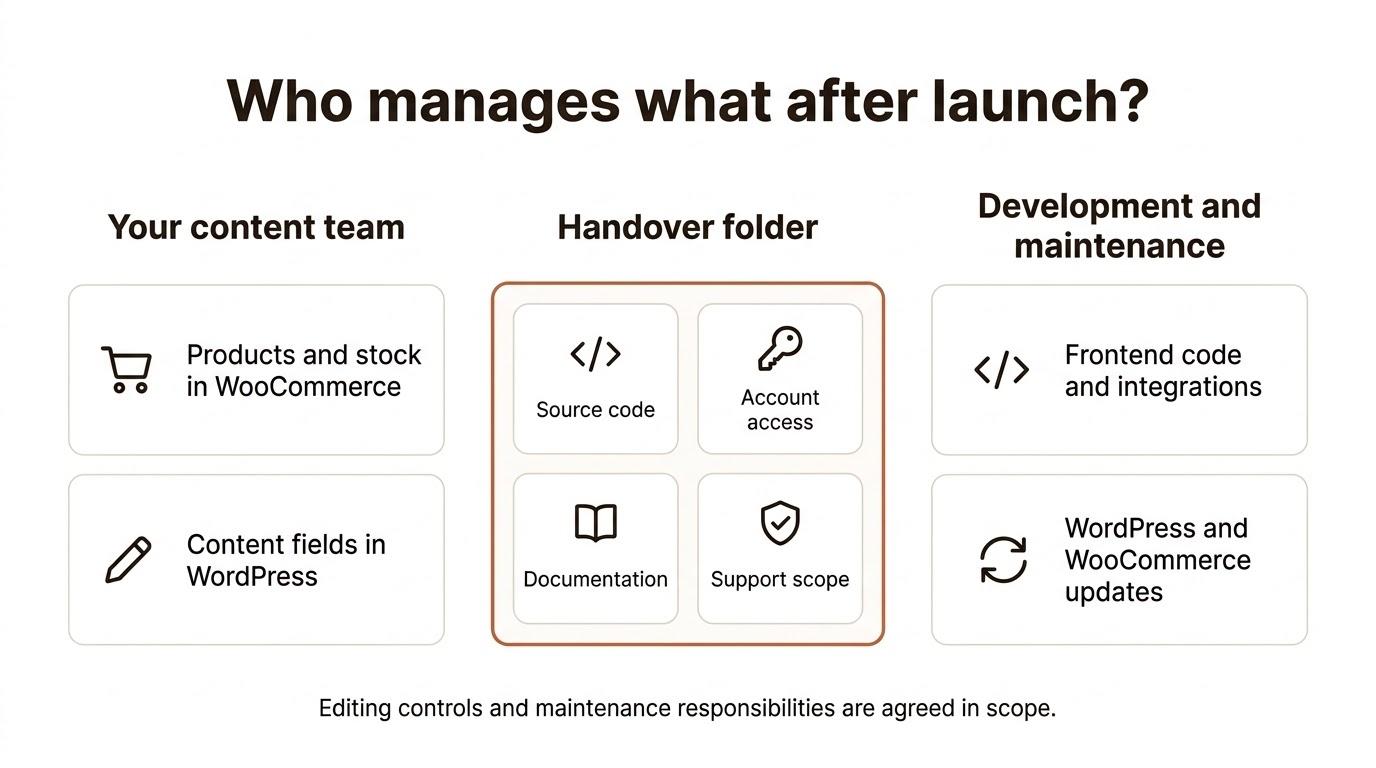
You can continue updating products, prices, inventory, and orders through WooCommerce. Articles and page content can remain in WordPress where included in the agreed content model.
The editing experience depends on what we build. A WordPress page-builder layout does not automatically render in Next.js. If your team needs reusable landing-page sections or draft previews, we include those requirements in the scope.
Handover covers the project source code, deployment information, and documentation specified in the proposal. We agree account ownership and access for hosting and third-party services before launch. Paid vendor tools retain their own licence terms.
Ongoing maintenance needs to cover both applications: WordPress/WooCommerce and the frontend. That includes updates, integration changes, error monitoring, and checks after releases. The proposal separates the included support window from any ongoing maintenance arrangement.
YOUR QUESTIONS
Frequently asked questions
Will we lose existing products, customers, or order history?
A frontend rebuild can use your existing WooCommerce backend, so those records can remain there. We still need to check data access and the new account interface. Moving to a new WordPress installation or changing data structure would be an additional migration scope.
Can we keep our current WooCommerce plugins?
Some can remain, some need an API connection, and some need a replacement interface. The answer depends on what each plugin does and the checkout approach. We assess the important plugins before finalising the build scope.
Can we keep WooCommerce checkout?
Yes, that can be the agreed approach. The work includes getting the cart and customer session into checkout correctly and testing the relevant payment, shipping, tax, and coupon behaviour.
Will Next.js make the store faster and improve rankings?
It gives us tools for rendering and caching, but the result depends on implementation, hosting, backend response times, images, and third-party scripts. Search rankings also depend on factors beyond the frontend. We would define the performance work and SEO checks without promising a ranking increase.
Can we still edit content ourselves?
Yes, for the fields and content sections included in the editing setup. Products can stay in WooCommerce and articles can stay in WordPress. New layouts and custom interactions may still need a developer.
Do all of our URLs need to change?
No. We aim to retain useful existing URLs where practical. Where a change is necessary, the launch scope should include the corresponding redirects and internal-link updates.
Can this include a headless WordPress content website?
We can scope WordPress content alongside the store, including articles and agreed page templates. A content-only headless WordPress website has different requirements from an ecommerce storefront and should be estimated separately.
Can you use a framework other than Next.js?
We can discuss an alternative during scoping. The framework needs to fit the required integrations, hosting, and the team responsible for maintaining it. Support for the selected stack is agreed before development starts.
How much does headless WooCommerce development cost, and how long does it take?
We need the store URL, required templates, important plugins, checkout requirements, and integrations to give a useful estimate. The comparison above shows the available service options. Your written proposal will state the price, milestones, and delivery dependencies.
Can we launch in stages?
A staged launch may be possible, but the boundaries need planning. If some pages remain on WordPress while others move to Next.js, routing, sessions, analytics, and SEO still need to work across both.
LET’S TALK
Tell us what your WooCommerce store needs to do
Send your store URL, the features you want to build, and the plugins or integrations your business depends on. If you already have a design, include that too.
We will review the requirements, explain whether a headless build fits, and identify the scope needed for an estimate.